A practical, beginner-friendly guide that breaks down core JavaScript concepts, clears up common misconceptions, and shows a smarter path to mastering the language through real understanding instead of memorization.
This is Part 3 of the series Web Development: From Zero to Production
If you haven't read my HTML & CSS blog read it out here:-HTML, CSS.
HTML builds the page.
CSS makes it look good.
JavaScript makes it come alive.
Buttons react.
Forms validate.
Yet most beginners struggle with JavaScript.
In this guide, you’ll learn JavaScript the way web developers actually use it:
through data, control, repetition, and interaction.
This guide provides the complete foundation a web developer needs to implement real application behavior.
What JS Actually Does
JavaScript is a programming language of the web.
It can calculate, manipulate & validate data.
It can change both HTML & CSS.
It listens, decides, changes things. It talks to server.
JavaScript plays the role of behavior in web.
Behavior means:
responding to human
Changing UI
managing data
communicating with servers
If HTML is the skeleton & CSS is the skin, JavaScript is the nervous system.
JavaScript Basics
JavaScript is the language of the web.
Let’s start with some basics:-
// This is a comment - the computer ignores this text

// Printing to the console
console.log("Hello, World!");

// Basic math operations
console.log(50 + 10); // Output: 60
console.log(10 - 50); // Output: -40
console.log(5 * 5); // Output: 25
console.log(10 / 20); // Output: 0.5
The console is your teacher - it’s where you can see output from your code and can learn from your mistakes and test things out while learning.
Variables & Data Types
Programming begins with 2 abilities:
Store information
Execute instructions
Everything else builds on this.
Variables are containers to store the data. In JS we have different ways to declare variables and we have different types of data to store:
// Declaring variables
let name = "Luffy"; // Use let when the value may change later
const age = 19; // Use const when the value won't change
var oldWay = "not used"; // Older way of declaring variables (avoided now)

// Basic Data Types
const myString = "Hello"; // Text (string)
const myNumber = 42; // Number
const isAwesome = true; // Boolean (true/false)
const nothing = null; // Explicitly nothing
const notDefined = undefined; // Value not assigned
const myArray = [1, 2, 3]; // Array (collection of values)
const myObject = { name: "Book" }; // Object (collection of key-value pairs)
Functions are reusable block of code. Think of them sub-tasks to complete major task.
// Basic function declaration
function greetings(name) {
  return "Hello, " + name + "!";
}

// Using the function
console.log(greetings("Alex")); // Output: "Hello, Alex!"

// Function that adds two numbers
function add(a, b) {
  return a + b;
}

const sum = add(5, 3);
console.log(sum); // Output: 8
Functions help avoid repeating code and make your program more organized. They can take inputs (parameters) and give back outputs (return values).
Arrow Functions
Arrow functions are a newer, shorter way to define functions. They’re especially useful for short & simple operations:
// Regular function
function double(num) {
  return num * 2;
}

// The same function as an arrow function
const doubleArrow = (num) => num * 2;

console.log(double(4)); // Output: 8
console.log(doubleArrow(4)); // Output: 8

// Multiple parameters need parentheses
const add = (a, b) => a + b;
console.log(add(3, 5)); // Output: 8

// For multiple lines, use curly braces and 'return'
const greet = (name) => {
  const message = "Hello, " + name + "!";
  return message;
};
Arrow functions are not just shorter - they also handle the this keyword differently, which becomes important when you start working with objects and events.
Scope
Scope determines the accessibility of the variables. JS has 3 types of scope.
// global scope
const x = 1;

console.log(x); // can acces anywhere

// Function scope
const greetings = () => {
  let name = "Luffy";
  return "Yo " + name; // can only access inside a function
};

// block scope
{
  let y = 10; // only accessible inside this block
}
// can't access here
Scopes tells where a variable is accessible and where it isn’t.
Arrays, Objects
Arrays & Objects are 2 ways to organize multiple data in a variable in JavaScript.
Arrays
Arrays are ordered collections of values. Whose index starts from 0.
// Creating an array
const fruits = ["apple", "banana", "orange"];

// Accessing items (starting from zero)
console.log(fruits[0]); // Output: "apple"
console.log(fruits[1]); // Output: "banana"

// Adding to the end of an array
fruits.push("mango");
console.log(fruits); // Output: ["apple", "banana", "orange", "mango"]

// Common array methods
const numbers = [1, 2, 3, 4, 5];

// map - transforms each item
const doubled = numbers.map((num) => num * 2);
console.log(doubled); // Output: [2, 4, 6, 8, 10]

// filter - keeps only items that pass a test
const evenNumbers = numbers.filter((num) => num % 2 === 0);
console.log(evenNumbers); // Output: [2, 4]
Objects are everywhere in JS. They're used for storing related data and creating more complex data structures.
Control Flow Statements
Control Flow statements are conditional logics.
Conditional logics let your code make decisions.
const age = 20;

// Basic if statement
if (age >= 18) {
  console.log("Eligible to vote");
} else {
  console.log("Not eligible to vote");
}

// Multiple conditions
const score = 85;

if (score >= 90) {
  console.log("Grade: A");
} else if (score >= 80) {
  console.log("Grade: B");
} else if (score >= 70) {
  console.log("Grade: C");
} else {
  console.log("Grade: F");
}

// Logical operators
const isLoggedIn = true;
const isAdmin = true;

if (isLoggedIn && isAdmin) {
  console.log("Welcome Admin!");
}

const isMember = false;
const hasFreeTrial = true;

if (isMember || hasFreeTrial) {
  console.log("You can access this content");
}
Logical Operators
And (&&) - Returns true if both expressions are true
OR(||) - Returns true if any one the expressions are true
NOT (!) - Returns true if false and false if true.
Loops
Loops are used to repeat the same process again and again until the condition satisfies. Once condition is false the loop stops.
// while loop - pre-tested loop
let i = 0;
while(i <= 10) {
	console.log(i); // 0, 1, 2, 3, 4, 5, 6, 7, 8, 9, 10
	i++;
}

// do-while loop - post-tested loop
let i = 1;
do {
	console.log(i); // 1, 2, 3, 4, 5, 6, 7, 8, 9, 10
	i++;
}while(i <= 10);

// for loop - iterative loop
for(let i = 0;i < 5; i++) {
	console.log(i);  // 0, 1, 2, 3, 4
}

// forEach loop - traverse through arrays
const arr = [1, 2, 3, 4, 5]
arr.forEach((item) => {
	console.log(item);
})

// for-in loop - traverse through objects
const person = { firstName: "Luffy" , age: 30 };
for(const key in person) {
	console.log(key + ":" + person[key}); //  "firstName: John", "age: 30"
}

// for-of loop - traverse through arrays
const cars = ["BMW", "Volvo", "Dodge Challenger"];
for (const car of cars) {
  console.log(car);
  // "BMW", "Volvo", "Dodge Challeneger"
}
Ternary Operator
The ternary operator is a shorter way (shorthand) of writing if/else statements.
const age = 20;

// Traditional if/else
let message;
if (age >= 18) {
  message = "You can vote!";
} else {
  message = "Too young to vote.";
}

// Same thing using ternary operator
const message = age >= 18 ? "You can vote!" : "Too young to vote.";

console.log(message); // Output: "You can vote!"

// Useful in React and other frameworks
const userType = "admin";
const greeting =
  userType === "admin" ? "Welcome, Administrator" : "Welcome, User";

console.log(greeting); // Output: "Welcome, Administrator"
Destructuring
Destructuring is a coinvent way to extract values from arrays or objects.
const user = {
  name: "Alex",
  age: 32,
  location: "Tokyo",
};

// Without destructuring
const userName = user.name;
const userAge = user.age;

// With destructuring
const { name, age, location } = user;

console.log(name); // Output: "Alex"
console.log(age); // Output: 32
console.log(location); // Output: "Tokyo"

// Using different variable names
const { name: fullName, age: years } = user;
console.log(fullName); // Output: "Alex"
console.log(years); // Output: 32

// Default values
const { name, country = "Unknown" } = user;
console.log(country); // Output: "Unknown" (since it doesn't exist in the object)
Destructuring makes your code cleaner and more readable, especially when working with complex data.
Template Literals
Template literals are a better way to work with string in JS. It’s a easier way of writing variables and text together.
const name = "Luffy";
const age = 30;

// Old way of combining strings
const greeting1 =
  "Hello, my name is " + name + " and I am " + age + " years old.";

// Using template literals
const greeting2 = `Hello, my name is ${name} and I am ${age} years old.`;

console.log(greeting2);
// Output: "Hello, my name is Luffy and I am 30 years old."

// You can also do calculations inside ${}
const price = 19.99;
const tax = 1.2;
const total = `The total is $${(price * tax).toFixed(2)}`;

console.log(total);
// Output: "The total is $23.99"

// Multi-line strings are easy with template literals
const message = `This is line one.
This is line two.
This is line three.`;

console.log(message);
// Output:
// This is line one.
// This is line two.
// This is line three.
Template literals make string formatting much easier and more readable than the old way of concatenating strings with +.
Rest/Spread Operator
The ... operator is one the most versatile features in modern JS.
Rest Operator
The rest operator collects multiple elements into single array:
The spread operator is especially useful in React when you need to create new arrays or objects without modifying the originals.
Optional Chaining
Optional Chaining helps prevent errors when accessing nested properties that might not exist:
const user = {
  name: "Alex",
  details: {
    age: 30,
    preferences: {
      theme: "dark",
    },
  },
};

// Without optional chaining (error-prone)
// If user.details or user.details.preferences is undefined,
// this will throw an error
// const theme = user.details.preferences.theme;

// With optional chaining (safe)
const theme = user?.details?.preferences?.theme;
console.log(theme); // Output: "dark"

// If a property doesn't exist
const country = user?.details?.location?.country;
console.log(country); // Output: undefined (no error!)

// With arrays
const users = [{ name: "Alex", role: "admin" }, { name: "Sarah" }];

console.log(users[0]?.role); // Output: "admin"
console.log(users[1]?.role); // Output: undefined (no error)

// With function calls
const getData = () => ({ value: 42 });
// const noData = undefined;

console.log(getData?.().value); // Output: 42
// console.log(noData?.().value); // Output: undefined (no error)
Optional chaining (introduced in ES2020) helps make your code more resilient and avoids many common errors when working with complex data structures.
DOM
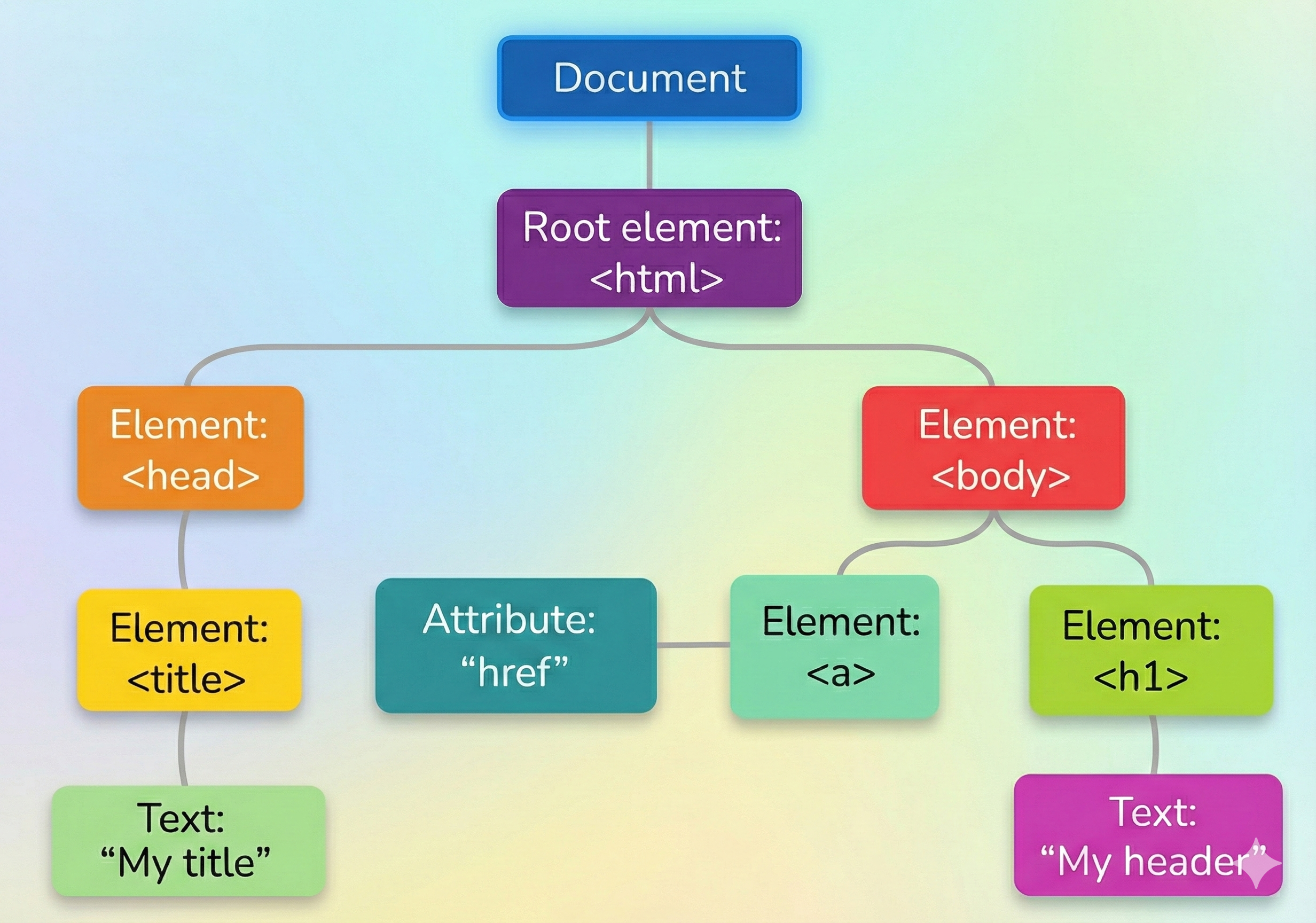
When the browser loads a page, it converts HTML into a tree of objects.
This structure is called the DOM (Document Object Model).
JavaScript can use the DOM to:
find elements
read information
change content
update styles
react to user actions
If JavaScript is the brain, the DOM is the body it controls.
What the DOM Looks Like
Every tag becomes a node that JavaScript can talk to.
Accessing HTML Elements
Before changing anything, we must select it.
Think:
find → store → manipulate
Common Selection Methods
getElementById()
Returns one element because IDs are unique.
querySelector()
Returns the first match using CSS selector rules.
getElementsByClassName()
Returns a live collection of elements.
getElementsByTagName()
Returns elements by tag.
Full Working Example (with all content methods)
<html>
  <body>
    <h1 id="title">Original Title</h1>
    <p class="para">Paragraph 1</p>
    <p class="para">Paragraph 2</p>

    <script>
      // SELECTING ELEMENTS

      // By ID (single element)
      const title = document.getElementById("title");

      // First match using CSS selector
      const firstPara = document.querySelector(".para");

      // Collection by class name
      const allParas = document.getElementsByClassName("para");

      // Collection by tag
      const headings = document.getElementsByTagName("h1");

      // CHANGING CONTENT

      // 1) textContent → changes only text
      title.textContent = "Updated with textContent";

      // 2) innerText → similar to textContent but respects styling/visibility
      firstPara.innerText = "Updated with innerText";

      // 3) innerHTML → can insert HTML tags
      allParas[1].innerHTML = "<strong>Updated with innerHTML</strong>";

      // READING CONTENT

      console.log(title.textContent);
      console.log(firstPara.innerText);
      console.log(allParas[1].innerHTML);
    </script>
  </body>
</html>
Understanding the Differences (VERY IMPORTANT)
textContent
Gets/sets raw text.
Fast. Safe. Preferred most of the time.
innerText
Considers CSS.
If something is hidden, it may not return it.
Used less frequently.
innerHTML
Reads or writes HTML markup.
Powerful but risky if content comes from users (can create security issues).
Use carefully.
Single vs Multiple Elements
Some methods give:
one element
Others give a list
Example:
const paras = document.getElementsByClassName("para");